In continuous integration (CI), development teams implement small changes and check in code to version control repositories frequently. Continuous delivery (CD) automates deployment to selected infrastructure environments. Most developers work on multiple deployment environment like production, development and testing. Any delay or bugs on these servers impacts all the development deployments.
Automation reduces the number of errors that can take place in the many repetitive steps of CI and CD.
An added advantage is that it saves developers time to be spent on product development and also reduces the risk of shipping erroneous code to production.
Karate:
Karate is a powerful open-source automation tool from Karate Labs, based on the BDD syntax popularised by Cucumber, making it language neutral and easy for even non-programmers. Test execution and report generation feels like any standard Java project. You don’t have to compile code. Just write tests in a simple, readable syntax.
Use case :
Our service hosted on Azure private PaaS is using Cucumber framework for doing the end to end functional tests of our REST APIs. Since we were already accustomed to Cucumber and had the tests written, we planned to explore the possibility of using Karate for handling the automation for our newly introduced Kafka component. And luckily, the decision turned out to be good one. :D
The major issues which we faced while running our existing Auto was the fact that we had to maintain a separate validation service using JPA to connect to our database and carry out the operations. With most of the teams working remotely, an unnecessary number of DB connections were being established thus blocking the developers and hindering their productivity. Even resource optimisation was not in place since a lot of resources were used even when no runs were happening.
However, since Karate provides an out of the box support to connect to various DB’s/Azure Resources/Kafka (SQL, blob, cosmos, etc) via feature files to run Java Classes inside feature files and rigorous methods to perform validations, we could do away with the validation service and move al the code to Karate.
Exploring the various advantages with each step, let’s take a look at how we implemented Kafka automation using karate.
Setup :
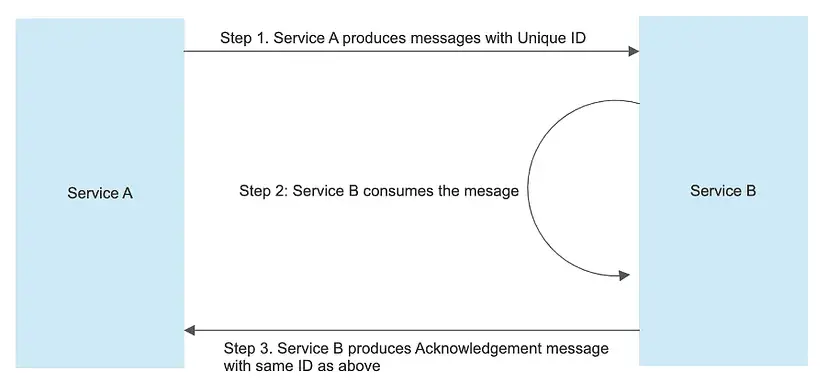
The scenario mainly consists of two services (Service A and Service B) interacting with each other using Kafka.
Flow would be as follows :
- Service A produces messages.
- Service B consumes the messages and produces an Acknowledgment packet based on the consumption of messages.
- On successful consumption, Service B produces a Business Packet as well.
Flow which will be simulated and automated using Karate:
- Message Production from Service A to Service B.
- Acknowledgement Packet validation from Service B to Service A.
Scenario Covered
In the below table, each packet produced by the Producer can be uniquely identified using the ID field.
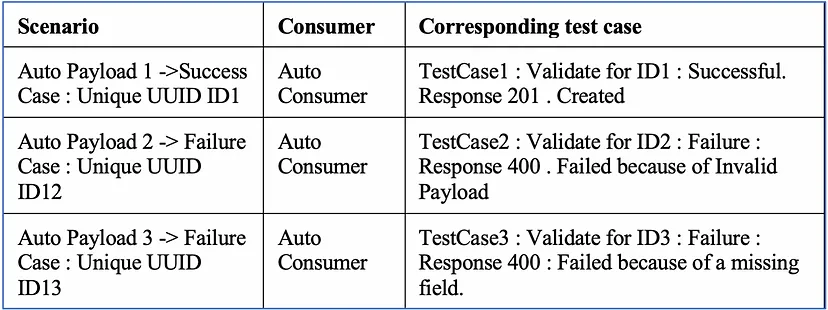 Scenario Covered
Create a Producer for populating messages to the topic for various scenarios ( successful as well as erroneous Packets )
- Create a singleton class for updating a HashMap which would contain the entries in the form of < KEY , TEST-CASE > . This would be called every time a new message is published by the producer. KEY → field through which we can uniquely identify the PRODUCER — CONSUMER pair (ID in our case). VALUE → name of the feature file which should be executed for that particular scenario.
- Create another Auto Consumer with a unique group id and listening to outgoing topics.
- Loop over all the messages picked by the Consumer and based on the ID, read the HashMap to determine the test case (feature file) to be executed.
The scenario defined in Table above would be handled in the following way by this approach :
ID1 -> Generated by Auto Producer → Entry will be there in HashMap → < ID1 , FeatureFile1.feature >
ID2 -> Generated by Auto Producer → Entry will be there in HashMap → < ID2 , FeatureFile2.feature >
ID3 -> Generated by Auto Producer → Entry will be there in HashMap → < ID3 , FeatureFile3.feature >
Once all the messages are published our Auto Consumer will kick in.
ID1 → Read from HashMap based on ID1 → Determine the feature file for that case ( FeatureFile1.feature ) and execute the set of validations.
ID2 → Read from HashMap based on ID2 → Determine the feature file for that case ( FeatureFile2.feature ) and execute the set of validations.
ID3 → Read from HashMap based on ID3 → Determine the feature file for that case ( FeatureFile3.feature ) and execute the set of validations.
Maven dependencies used :
Karate Dependency
<dependency>
   <groupId>com.intuit.karate</groupId>
   <artifactId>karate-apache</artifactId>
   <version> 0.9.5</version>
</dependency>
Kafka Client dependency:
Approach used:
This is how our Karate feature file will look.
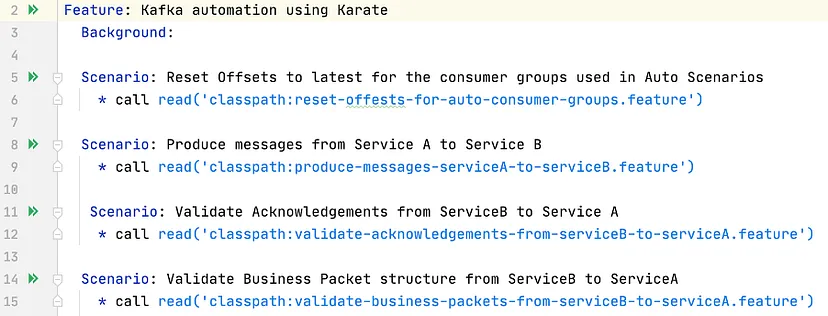 Karate feature file used
Step 1 :
Reset the offsets used for consumer groups used in your automation scenarios to the latest values so that the messages published for Automation Scenarios would be picked instead of other messages thus ensuring smooth runs.
 Reset offset to latest
In our feature file, we will be calling the JAVA code to reset the offset to latest before the execution of other steps kicks in.
Step 2:
Produce messages from Service A to Service B.
In this step, we would be reading the JSON or XML or any other format based on our needs and publish the same to Service B’s incoming topic. Producer is written in JAVA and is a Kafka client that publishes records to the Kafka cluster.
Karate feature file to publish messages:
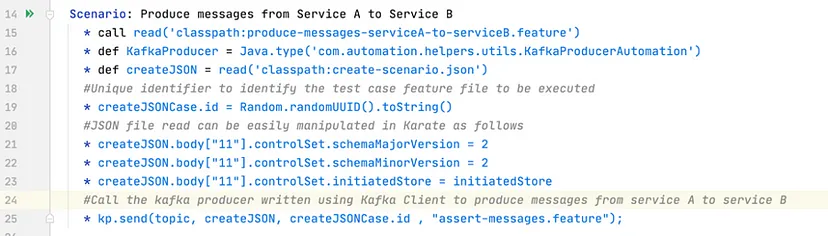
Java code for sending the data to the subscribed topic.
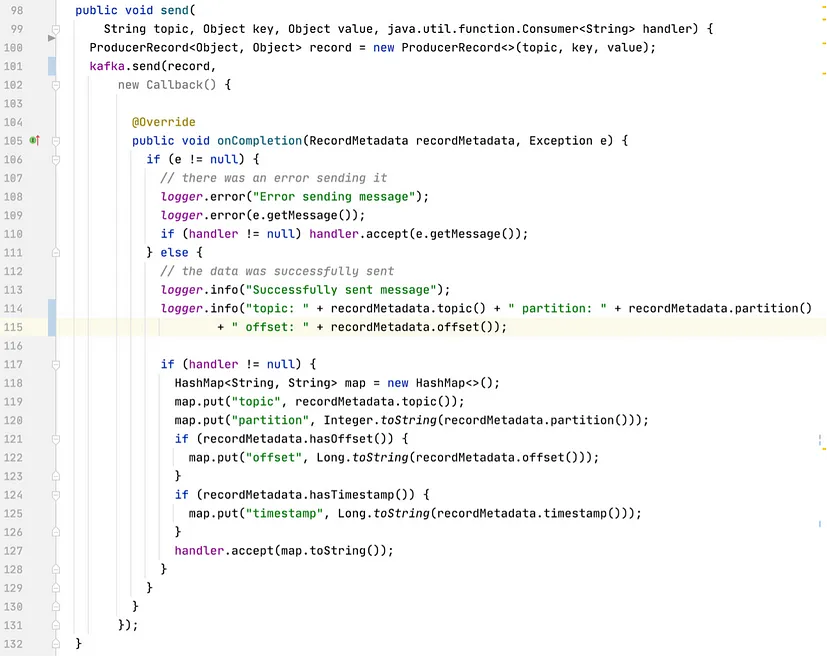
Step 3:
Validate Acknowledgement packet from Service B to Service A
Major steps in this scenario will be :
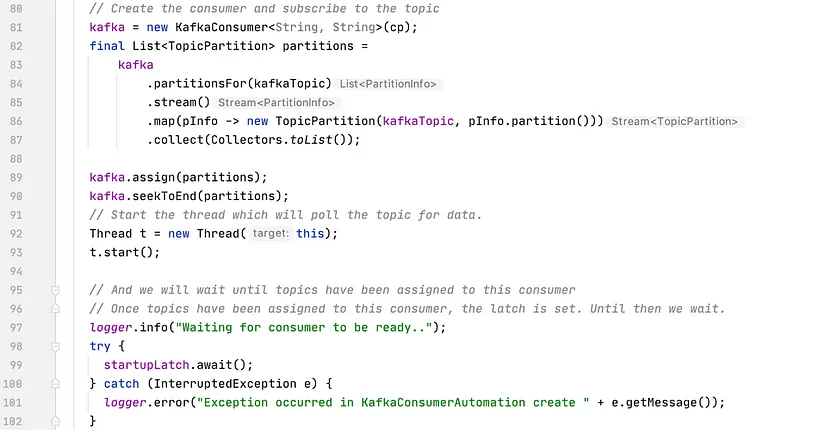
- Fetch acknowledgement packets from Service B to Service A. We will be using a Kafka Client consumer to read messages. Until you call poll(), the consumer is just idling. Only after poll() is invoked, it will initiate a connection to the cluster, get assigned partitions and attempt to fetch messages. So we will call poll() and then wait for some time until the partition is assigned. Then raise a signal ( countdown latch ) so that the constructor can return.
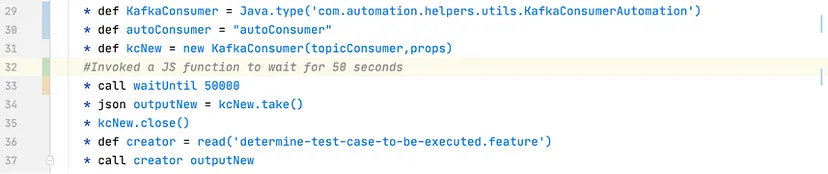
Determine test case to be executed based on ID with which we had published the messages in Step 2.
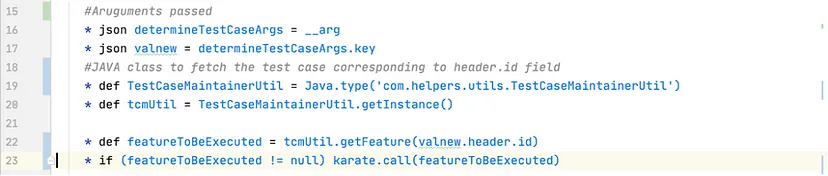
Perform the set of validations.
Conclusion:
After analysing and moving the existing set of tests running on Cucumber to Karate, we definitely saw an improvement in the time taken for test runs because of the parallel runs provided by Karate along with added advantages as :
- Data-driven tests that can even use JSON or CSV sources
- Easy re-use of JSON or JS / Java logic across tests
- Powerful and flexible payload assertions
- Parallel Execution with Reports Aggregated
- Easy CI integration via cross-platform executable / CLI
Acknowledgements:
Thanks to Mayur Patki for helping on finalising the approach and design.